

Have you ever wondered how your browser knows exactly where to go when you type a website address like www.telahosting.co.za? The answer begins with something called nameservers.
Nameservers are one of the most important parts of how the internet works. They act as the bridge between your domain name and the web hosting server where your website files are stored. Without nameservers, your domain would not know where your website lives, and visitors would not be able to load your site properly.
If you are planning to build a website, connect a domain to hosting, use professional email, or transfer a domain to a new hosting provider, understanding nameservers will help you avoid common mistakes and manage your website with more confidence.
In this guide, you will learn what nameservers are, how nameservers work, how they connect domain names to hosting, how DNS queries happen behind the scenes, and how to update nameservers correctly.
What Are Nameservers?
A nameserver is a server that helps direct a domain name to the correct hosting server. In simple terms, nameservers tell the internet where your website is stored.
When someone types a domain name into a browser, the browser does not automatically know where that website is hosted. It needs a system that can look up the correct destination. Nameservers provide that direction by helping translate the domain into the correct server location. Your original article describes nameservers as a directory that tells your computer where to find the server hosting a website.
For example, when someone enters a website address such as www.takealot.com, the nameserver helps point that request to the correct IP address so the browser can open the site.
That is why nameservers are often described as the link between your domain registration and your hosting account.
What Is the Difference Between Nameservers and DNS?
Many beginners confuse DNS and nameservers, but they are closely related rather than identical.
- DNS stands for Domain Name System. It is the wider system that helps convert domain names into IP addresses.
- Nameservers are part of that system. They store or point to the DNS records that tell the internet where your website and related services should go.
In simple terms, DNS is the overall network of domain lookups, while nameservers are the specific servers that answer or manage those lookups for your domain.
How Nameservers Work
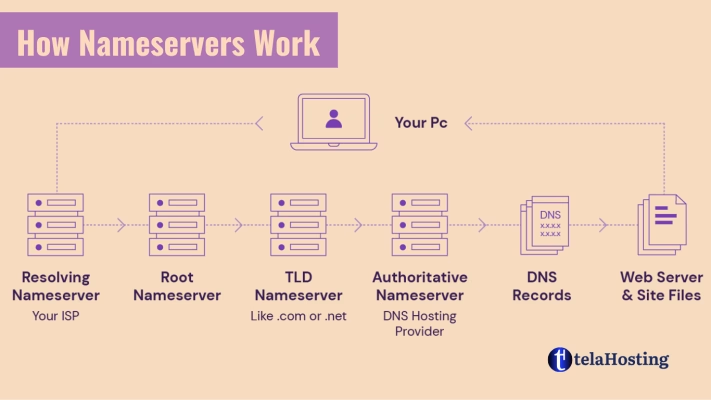
Let’s break the process down into simple steps.
- You type a domain name into your browser.
For example, you type superbalist.com. - Your browser starts a DNS lookup.
It asks the Domain Name System for the IP address connected to that domain. Your source explains that this DNS query goes to the nameserver linked to the domain. - The nameserver checks its records.
It looks up the domain and finds the correct IP address or hosting destination associated with that website. - The browser connects to the hosting server.
Once the correct destination is returned, the browser loads the website from the hosting server.
This whole process usually happens in seconds, often so quickly that the user never notices it.
Nameservers as the Middlemen Between Domain and Hosting
An easy way to understand nameservers is to think of them as middlemen or internet signposts.
Imagine someone asks for the address of a popular restaurant. They may not know the exact location, so they check a trusted directory that points them in the right direction. Nameservers do the same thing on the internet. They receive a request for a domain name and direct that request to the correct hosting server. Your original article used this same “directory” and “middlemen” explanation because it makes the concept easier for beginners to understand.
Without nameservers, a domain name would exist, but it would not know which hosting server should respond when someone tries to visit the website.
Why Nameservers Matter for Every Website Owner
If you own a domain name or run a website, nameservers matter because they directly affect whether your website, email, and other domain services work properly.
- They connect your domain to your hosting provider.
- They make your website accessible online.
- They help support email routing and other DNS-related services.
- They allow you to switch hosting providers without changing your domain name.
Your original article highlights these same benefits, especially that nameservers connect domains to hosting, enable website access, support email and other services, and add flexibility when moving providers.
In practical terms, if your nameservers are wrong, your website may not open, your business email may stop working, or visitors may be sent to an old hosting server.
Where Are Nameservers Used?
Nameservers are used whenever a domain needs to be connected to an online service. Your source outlines three common examples: website setup, email hosting, and domain transfers.
1. Website Hosting
When you buy a domain name and hosting separately, one of the first steps is to point the domain to the hosting provider’s nameservers. This makes your website accessible online.
2. Business Email Hosting
If you want to use a custom email address such as [email protected], nameservers help support the DNS setup needed for email routing, mail delivery, and service configuration.
3. Domain Transfers and Hosting Changes
If you move your website from one provider to another, updating nameservers is often part of the migration process. This helps redirect your domain to the new hosting environment.
4. Launching New Websites
New website owners often buy a domain before their website is fully ready. Once the hosting account is created, the nameservers are updated so the domain points to the correct hosting server.
5. Managing Multiple Services Under One Domain
Some businesses use one domain for their website, email, subdomains, and other services. Nameservers help coordinate how all these services are connected through DNS records.
Real-Life Examples of How Nameservers Are Used
Scenario 1: Starting a Small Business Website
Imagine you just registered www.southstyles.co.za and purchased hosting from telaHosting. To make your website live, you would update the domain’s nameservers to the ones provided by your host, such as:
- ns1.telahosting.co.za
- ns2.telahosting.co.za
Your source uses this same example to show that these nameservers tell the internet where the website files are stored.
Scenario 2: Setting Up School or Business Email
If a school or company wants custom email addresses for staff, the domain’s nameserver and DNS setup helps route those email services correctly. Your original article used a school email example to explain this.
Scenario 3: Moving to a Better Hosting Provider
If your current website host is slow or unreliable, you may move your website to a new host. In that case, one of the main steps is updating your nameservers so your domain starts pointing to the new server instead of the old one.
Scenario 4: Connecting a Domain Bought Elsewhere
Many people register a domain with one company and buy hosting from another. In that case, nameservers are what connect both services together.
Common Nameserver Formats
Nameservers usually follow a simple format. Your source gives examples such as:
- ns1.telahosting.co.za
- ns2.telahosting.co.za
- da1.telahosting.co.za
- da2.telahosting.co.za
These examples show that hosting providers may use different naming structures depending on their server environment.
The most common pattern is:
- ns1.example.com
- ns2.example.com
The “ns” usually stands for nameserver, while the number helps distinguish the primary and secondary nameservers.
Relationship Between Domain Name, Nameservers, and Web Hosting
Your original article included a helpful table showing how these three parts work together. Here is an expanded version.
| Component | What It Means | Role in Website Setup |
|---|---|---|
| Domain Name | A human-friendly address such as www.telahosting.co.za | It gives people an easy way to find your website. |
| Nameservers | Servers that direct the domain to the correct DNS records and hosting destination | They act as the connection point between the domain and the server. |
| Web Hosting | The server space where your website files, databases, and content are stored | It delivers the actual website content when visitors open your domain. |
Without a domain name, users would need to remember an IP address. Without hosting, there would be no website files to display. Without nameservers, the domain would not know which hosting server to load. That is why all three work together.
Nameservers vs A Record: What Is the Difference?
This is another area that confuses many beginners.
- Nameservers point your domain to the DNS provider or hosting environment managing your DNS.
- An A record points a specific domain or subdomain directly to an IP address.
In many simple setups, website owners just change nameservers because it is easier and the hosting company handles the DNS records for them. In more advanced setups, someone may keep their nameservers somewhere else and edit A records manually.
So, nameservers are usually the bigger control point, while A records are one part of the DNS details under that control.
How to Check and Update Nameservers
Your source explains that updating nameservers is straightforward and usually happens inside the account where the domain was registered.
- Log in to your domain registrar account.
Access the account where you registered your domain. - Go to your domain management area.
Find the option to manage the domain or edit DNS/nameserver settings. - Locate the nameserver section.
It may be labeled “Nameservers,” “DNS Management,” or “Custom Nameservers.” - Replace the existing nameservers.
Enter the nameservers provided by your hosting company, such as:
ns1.telahosting.co.za
ns2.telahosting.co.za - Save your changes.
Once saved, your registrar will begin updating the domain’s nameserver settings. - Allow time for propagation.
Your original article notes that changes can take up to 48 hours to propagate across the internet.
How Long Do Nameserver Changes Take?
Nameserver changes may begin working within minutes, but full DNS propagation can take up to 24 to 48 hours worldwide. Your source mentions this clearly in both the setup instructions and FAQ section.
During this period, some visitors may see the new website while others still see the old one. That is normal and usually temporary.
Common Nameserver Mistakes to Avoid
- Using the wrong nameservers for your hosting provider
- Editing one nameserver only instead of both the primary and secondary nameservers
- Expecting instant updates without allowing time for propagation
- Confusing nameservers with A records or other DNS records
- Changing nameservers without checking email impact, especially if business email depends on the same DNS zone
- Leaving old DNS settings active elsewhere and becoming confused about which provider controls the domain
Can Nameservers Affect Website Speed?
Yes, they can. Your source already notes that slow or misconfigured nameservers can lead to delays in resolving your domain.
While nameservers are not the main factor behind full page load speed, they do affect how quickly the browser can find your website in the first place. If the DNS lookup is delayed, the website may feel slower to start loading.
That is why it is important to use a reliable hosting or DNS provider with stable nameserver infrastructure.
How Nameservers Help with Email and Other Services
Nameservers do not only affect websites. They also support other domain-related services, including:
- Business email
- Subdomains
- Webmail routing
- Verification records
- External apps connected to your domain
Your original article mentions that nameservers help route emails and manage other services linked to the domain.
This means if you change nameservers carelessly, your website may work while your email stops, or the opposite can happen. That is why nameserver changes should always be done carefully.
When Should You Change Nameservers?
You usually change nameservers in situations like these:
- When you buy new hosting for an existing domain
- When you transfer your website to a new hosting company
- When your DNS will now be managed by a different provider
- When launching a website for the first time after registering the domain
If nothing about your website or DNS provider is changing, you usually do not need to edit nameservers.
Frequently Asked Questions About Nameservers
What happens if I do not update my nameservers?
If you do not update your nameservers after purchasing hosting, your domain may not point to your website correctly, and visitors may not be able to access it. Your source states this directly in the FAQ section.
How long do nameserver changes take?
They can begin working in a short time, but full propagation may take up to 48 hours globally.
Can I use nameservers from one host with another hosting provider?
In most normal hosting setups, you should use the nameservers provided by the hosting company or DNS provider handling your domain’s DNS. Your original article makes this point clearly.
How do I know which nameservers to use?
Your hosting provider normally sends the correct nameservers when your hosting account is created. Your source says the provider will give you these details when you sign up.
Can nameservers affect website performance?
Yes. Slow or misconfigured nameservers can delay domain resolution and affect how quickly a website begins loading.
Do I need to change nameservers if I only changed website files?
No. If your website remains on the same hosting and DNS provider, updating website files alone usually does not require any nameserver change.
What is DNS propagation?
DNS propagation is the period during which nameserver or DNS changes spread across internet networks globally. During this time, some users may still see the old destination while others see the new one.
Conclusion
Nameservers are one of the most important parts of connecting a domain name to a website. They act as the bridge between your domain and the server where your website is hosted, helping visitors find the right destination whenever they type your domain into a browser. Your original article already established this core relationship clearly, and expanding it shows just how central nameservers are to websites, email, and domain management.
Whether you are launching a new business website, setting up professional email, moving to a new hosting provider, or simply learning how domain names work, understanding nameservers will help you avoid downtime, prevent confusion, and manage your online presence more effectively.
Ready to get started? Register your domain with telaHosting or explore reliable hosting solutions for your website today.