

Introduction
Choosing a reliable hosting provider or effectively setting up your reseller hosting platform is not enough for you to succeed out there in the reseller hosting business. Creating the right hosting packages is one of the most important steps in building a successful reseller hosting business in South Africa.
If your packages are too complicated, clients get confused. If they’re too cheap, you lose profit, and also, some clients might see it as a conniving scheme to lure them in and increase the price later on, or perhaps because you have a poor hosting infrastructure. And if they don’t match local needs, you may struggle to attract customers.
The plan is simple: create clear, valuable, and easy-to-understand hosting plans that appeal to South African businesses while generating consistent income for you.
How to Create Hosting Packages
To create a hosting package is straightforward and easy. It depends on the tool you are using. The most popular option is WHM. We will show how to create a hosting package in WHM.
Creating hosting packages in WHM (Web Host Manager) allows you to define how much space, bandwidth, and features each client who subscribes to the package gets. Once created, you can assign these packages to any new hosting account.
1. Log in to WHM
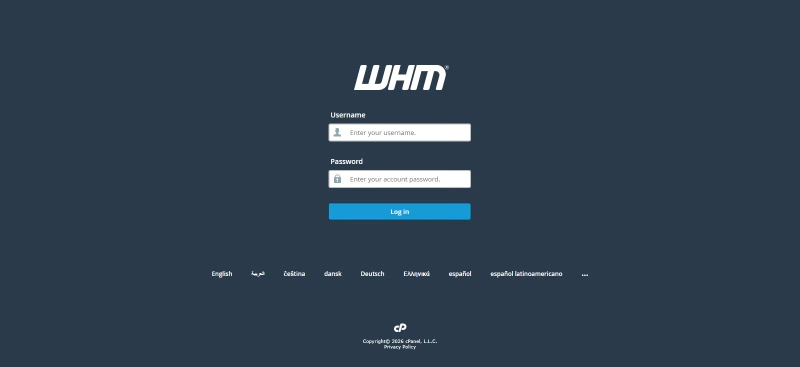
First, log in to your WHM with the login information provided to you by your hosting provider upon registration
2. Navigate to “Add a Package.”
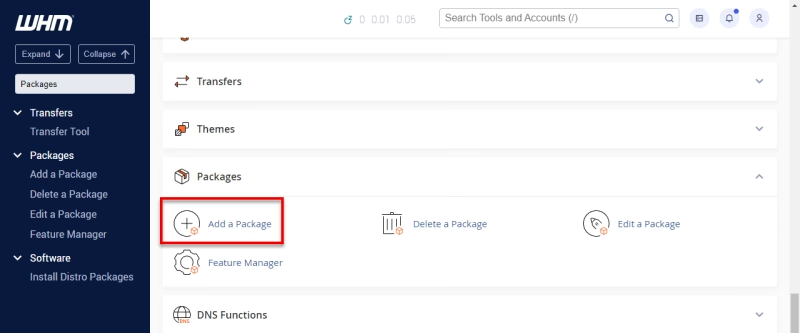
On the left-hand sidebar, locate the search bar and Type: “Add a Package,” then click on Add a Package
3. Enter Package Name
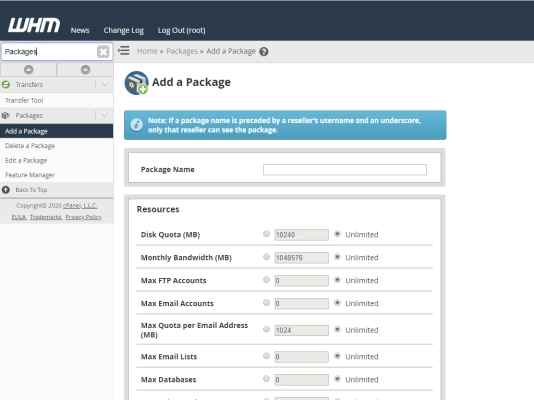
In the Package Name field, type a name like starter, business, or premium, for example. It is important to keep the names simple and easy to recognize.
4. Set Resource Limits
In the image above, you will see that there are certain values required to fill. Now define what each plan should include:
The Basic Settings are:
- Disk Space Quota (MB): e.g., 5000 (5GB)
- Monthly Bandwidth (MB): e.g., 50000
- Max FTP Accounts: e.g., 5 or unlimited
- Max Email Accounts: e.g., 5 or unlimited
- Max Email Lists: optional
- Max Databases: e.g., 5 or unlimited
These limits control what your clients can use.
5. Set cPanel Features
Moving forward, select a Feature List (usually default unless customized). Choose whether to allow CGI access or Shell access (leave off for beginners)
If you’re not sure, leave the default settings.
6. Choose Settings (Optional but Important)
Some additional information required of you to configure is:
- Max Addon Domains (how many extra websites allowed)
- Max Subdomains
- Max Parked Domains
For Example:
Starter – 1 website
Business – multiple websites
7. Select Package Options
Tick options like:
- Dedicated IP (usually NO for beginners)
- cPanel access
- Digest authentication (optional)
Most of these settings from 5-7 are default, and it is recommended to leave them that way, unless you are sure of what you are doing.
8. Click “Add.”
Finally, scroll down and click “Add.”
That’s it! Your hosting package is now created!
Furthermore, let’s explore how you can create your first hosting package the right way.
Strategies for Creating Hosting Packages
Strategy 1: Understand Your Target Clients
Before creating any package, you first of all need to know who you are selling to. Most typical clients in South Africa may include:
- Small business owners
- Startups
- Freelancers
- Churches and NGOs
- Local service providers (salons, plumbers, consultants)
Most of these clients don’t need complex hosting; all they want is:
- Affordable pricing
- Reliable performance
- Local support
- Simplicity
So your packages should focus on practical needs, not technical complexity.
Strategy 2: Start With 2–3 Simple Packages
One common mistake most new resellers make is offering too many plans.
The goal is to keep it simple with 2 or 3 clear options:
A Structural example to follow:
1. Starter Plan
- 1 website
- 15GB storage
- 1–5 email accounts
- Basic support
2. Business Plan
- 5–10 websites
- 10–20GB storage
- Unlimited emails
- Free SSL
- Priority support
3. Premium Plan
- Unlimited websites
- Higher storage
- Advanced features
- Daily backups
- Priority or managed support
Something like this that is simple will make it easier for clients to decide quickly.
Strategy 3: Focus on Benefits, Not Just Features
Some clients don’t understand technical terms like bandwidth or disk space.
Instead of saying:
“10GB SSD storage”
Say:
“Enough space to run your business website smoothly”
Highlight benefits such as:
- Fast website speed
- Reliable uptime
- Secure hosting
- Professional email
- Local support
People buy results, not specifications.
Step 4: Price Your Packages Strategically
Pricing is where many beginners struggle.
Consider this simple approach:
- Research the prices of other South African hosting providers
- Don’t aim to be the cheapest
- Price based on value + support
Example Pricing (Just a Guide):
- Starter: R79 – R129/month
- Business: R129 – R249/month
- Premium: R249+/month
Remember: you’re not just selling hosting, you’re selling service, support, and reliability.
Strategy 5: Include Value-Added Features
To stand out in the South African market, include extras or add-ons that make your offer more attractive:
- Free SSL certificates
- Email hosting
- Website backups
- Easy WordPress installation
- Basic support or guidance
These small additions can make a big difference in conversions.
Strategy 6: Bundle Hosting With Other Services
Hosting sells better when combined with other services.
You can bundle:
- Website design + hosting
- Domain registration + hosting
- Maintenance + hosting
- SEO setup + hosting
Bundles increase perceived value and make your offer easier to accept.
Strategy 7: Make Your Packages Easy to Understand
Your pricing page should be simple and clear.
Avoid:
- Too many technical terms
- Too many plan options
- Confusing pricing structures
Instead, use:
- Clear package names
- Short descriptions
- Bullet points
- Simple pricing
The goal is for your client to understand your offer in 10 seconds.
Strategy 8: Adjust Over Time
Your first packages don’t have to be perfect. As you get clients, you’ll learn:
- Which plans sell more
- What clients actually need
- Where can you improve
Don’t be afraid to adjust pricing or features as your business grows, but ensure to notify your clients before doing so.
Conclusion
Creating hosting packages for South African clients doesn’t have to be complicated. Focus on simplicity, value, and clarity.
Start with a few well-structured plans, price them strategically, and improve as you grow.
With the right packages in place, your reseller hosting business becomes easier to sell, easier to manage, and much more profitable.
Ready to get started?
Check out the best reseller hosting plans in South Africa
Feel free to contact support anytime for assistance